> For the complete documentation index, see [llms.txt](https://support.corostw.com/llms.txt). Markdown versions of documentation pages are available by appending `.md` to page URLs; this page is available as [Markdown](https://support.corostw.com/user-manual/hydrop-manual-taiwan/43475125770004-set-up-and-pair-hydrop.md).
# 設定並配對 HYDROP
### 盒子裡有什麼?
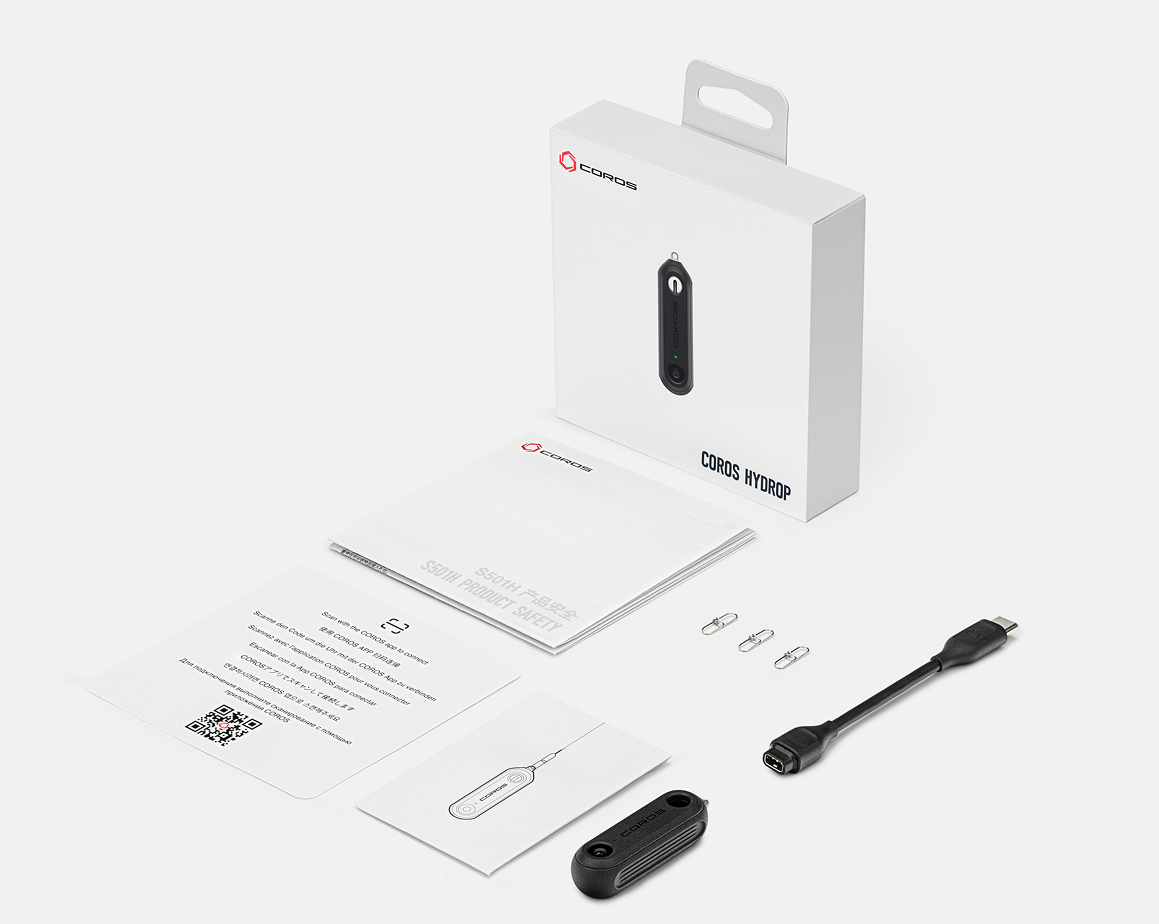
COROS HYDROP 隨附 USB-C 轉 COROS A2 充電線、充電盒和 3 個八字環。
 ### 將 HYDROP 與您的 COROS 應用程式配對
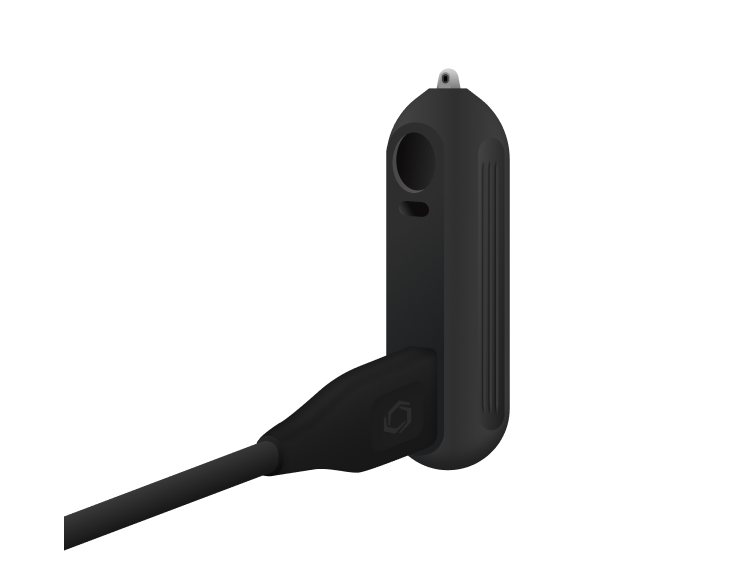
1. 首次使用 HYDROP 時,需要使用隨附的 USB-C 線連接電源。將充電線插入 HYDROP 背面,等待 HYDROP 正面出現橘色指示燈閃爍。
### 將 HYDROP 與您的 COROS 應用程式配對
1. 首次使用 HYDROP 時,需要使用隨附的 USB-C 線連接電源。將充電線插入 HYDROP 背面,等待 HYDROP 正面出現橘色指示燈閃爍。
 2. 開啟 COROS APP,進入「我」頁面(第四個標籤頁)。選擇**“配件”**選單, 然後點選“新增”。
* 請勿在個人資料頁面頂部選擇「新增設備」。您需要透過「配件」選單配對 HYDROP。
3. 等待手機偵測到 HYDROP 並完成配對過程。
2. 開啟 COROS APP,進入「我」頁面(第四個標籤頁)。選擇**“配件”**選單, 然後點選“新增”。
* 請勿在個人資料頁面頂部選擇「新增設備」。您需要透過「配件」選單配對 HYDROP。
3. 等待手機偵測到 HYDROP 並完成配對過程。
 ### 將 HYDROP 與您的 COROS 手錶配對
*\*HYDROP 僅相容於 COROS NOMAD、VERTIX 2 和 VERTIX 2S。它與其他手錶型號或品牌不相容。*
HYDROP 連接到您的 COROS APP 後,將自動新增至您已連接的 COROS 手錶。如果您在手錶的「配件」選單或「工具箱」選單中沒有看到 HYDROP,您可以按照以下步驟手動配對:
1. 在您的 COROS 手錶上,長按返回按鈕即可開啟工具箱選單。
2. 捲動至“設置”>“配件”>“新增藍牙”
3. 搖晃 HYDROP 幾次,直到裝置正面橘色指示燈閃爍,表示 HYDROP 已進入配對模式。等待手錶偵測到 HYDROP 並與其配對。
連接後,每次使用 HYDROP 進行測量時,您的手錶和 HYDROP 都會自動同步資料。
### 將 HYDROP 與您的 COROS 手錶配對
*\*HYDROP 僅相容於 COROS NOMAD、VERTIX 2 和 VERTIX 2S。它與其他手錶型號或品牌不相容。*
HYDROP 連接到您的 COROS APP 後,將自動新增至您已連接的 COROS 手錶。如果您在手錶的「配件」選單或「工具箱」選單中沒有看到 HYDROP,您可以按照以下步驟手動配對:
1. 在您的 COROS 手錶上,長按返回按鈕即可開啟工具箱選單。
2. 捲動至“設置”>“配件”>“新增藍牙”
3. 搖晃 HYDROP 幾次,直到裝置正面橘色指示燈閃爍,表示 HYDROP 已進入配對模式。等待手錶偵測到 HYDROP 並與其配對。
連接後,每次使用 HYDROP 進行測量時,您的手錶和 HYDROP 都會自動同步資料。
HYDROP 無法與我的 COROS APP 配對
1. **請確保 HYDROP 已連接電源**並正在充電。 HYDROP 正面的橘色指示燈應閃爍,表示正在充電並已準備好配對。
2. **透過配件選單配對:**在 COROS APP 的「我」頁面中,開啟「配件」選單。請勿點選「我」頁面頂部的「新增設備」。 HYDROP 必須在「配件」選單中進行配對。
3. **關閉藍牙:**如果您的手機和 HYDROP 無法連接,請將手機的藍牙關閉 30 秒,然後再開啟藍牙並再次嘗試配對過程。
4. **重新啟動 HYDROP:**
1. 將 HYDROP 連接電源,等待裝置正面橘色指示燈亮起。
2. 亮起後,拔除 HYDROP 的電源。
3. 重複此過程四次,完成重啟。
HYDROP 無法與我的 COROS 手錶配對
HYDROP 與 COROS NOMAD、VERTIX 2 和 VERTIX 2S 相容。
1. **刪除先前的連線:**
1. 如果 HYDROP 之前已連接到其他 COROS 帳戶或 COROS 手錶,請確保在嘗試與新裝置配對之前,已將其從該裝置中刪除。
2. 您可以透過 COROS APP 刪除 HYDROP,方法是:前往「我」頁面 > “配件” > 選擇 HYDROP > “移除”。
3. 若要從 COROS 手錶中刪除 HYDROP,請前往「設置」 > “配件” > “HYDROP” > “刪除”。
2. **手動配對:**
1. 長按 COROS 手錶上的返回按鈕開啟工具箱選單。
2. 捲動至“設置”>“配件”>“新增藍牙”。
3. 手錶搜尋附近配件時,搖晃 HYDROP 幾次以將其從睡眠模式喚醒。
4. HYDROP 正面的橘色指示燈應閃爍。
3. **重啟兩台設備**
* **重啟手錶:**按住電源鍵 15 秒,即可重新啟動 COROS 手錶。
* **重啟HYDROP:**
* 連接電源重啟 HYDROP。等待裝置正面橙色指示燈亮起。
* 亮起後,拔掉 HYDROP 的電源。重複此步驟四次,完成重開機。